
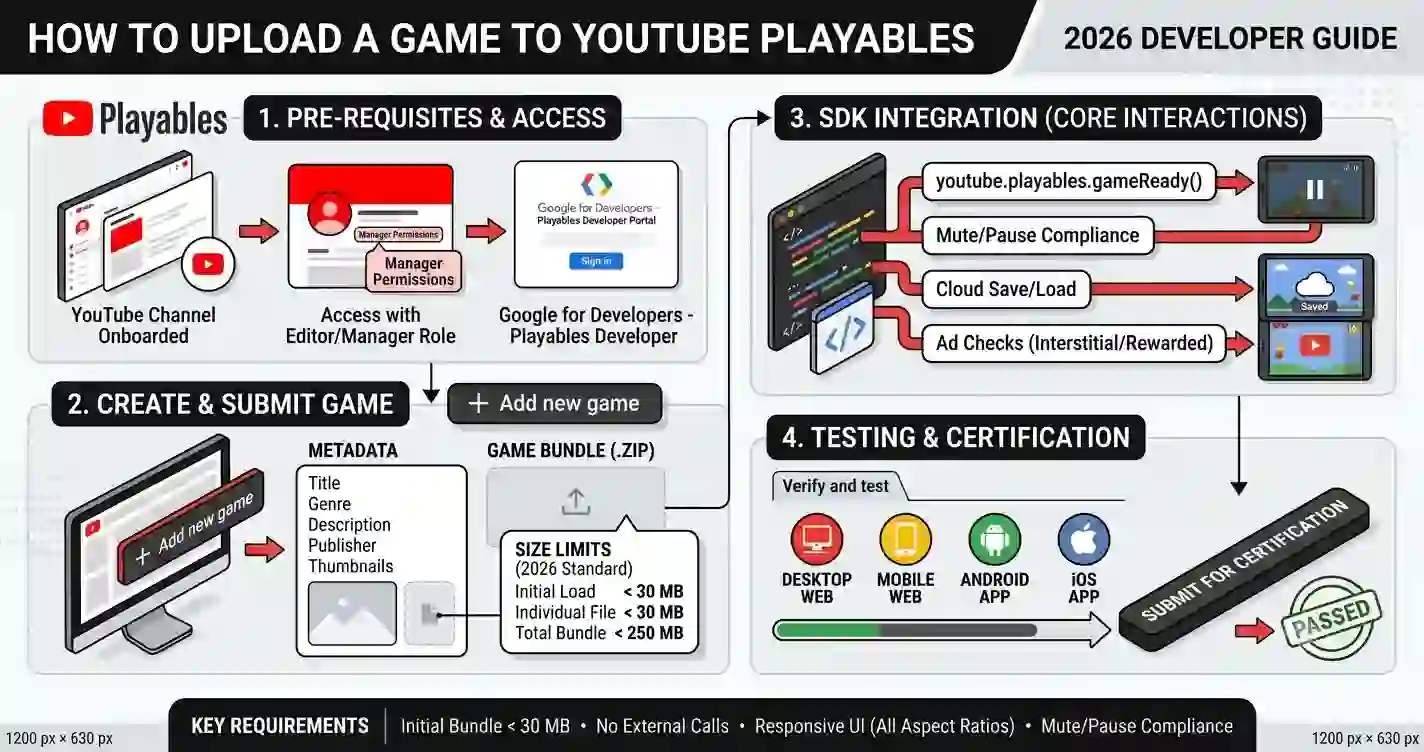
Submitting an HTML5 game to YouTube Playables is not simply a matter of uploading a ZIP file and waiting for approval. A game can look polished in a desktop browser and still fail when tested on a mobile device, a slower connection, or a different screen size. Small problems—such as a delayed touch response, a broken asset path, or an intrusive advertisement—can turn an otherwise promising game into a frustrating review experience.
Common Reasons YouTube Playables Games Get Rejected
For independent developers, the cost of rejection is more than another round of coding. You may need to rebuild assets, test multiple devices, review third-party libraries, and resubmit after making changes. That is why a proper pre-submission audit is so valuable. Finding problems before review is usually faster than discovering them after a rejection.
YouTube Playables games are designed for quick, accessible gameplay. Players should be able to open a game, understand what to do, and start playing without unnecessary friction. The same principle applies to technical quality: the game should load reliably, respond immediately, scale correctly, and behave predictably when the player switches tabs or encounters an interruption.
This guide explains the most common rejection risks for HTML5 games and shows how to fix them. It covers performance, asset loading, responsive design, monetization, controls, privacy, and content compliance. The goal is not merely to pass a review—it is to build a game that remains stable and enjoyable after approval.
Common Reasons YouTube Playables Games Get Rejected
1. Technical and Performance Issues
Technical problems are among the most important things to investigate before submitting a game. A game that works perfectly on a developer’s computer may behave very differently on a budget Android phone or a device with limited memory.
Touch response delay
Mobile players expect controls to respond immediately. If a button takes half a second to react, the game can feel broken even when the underlying JavaScript is functioning correctly.
- Common causes: heavy event handlers, unnecessary animations, excessive DOM updates, or input logic that waits for an unrelated operation.
- Fix: keep touch handlers lightweight and update the game state immediately.
- Best practice: use Pointer Events where appropriate so mouse, touch, and stylus input can share the same control logic.
canvas.addEventListener("pointerdown", (event) => {
  event.preventDefault();
  handleInput(event.clientX, event.clientY);
});
Avoid putting expensive calculations, large loops, or asset loading directly inside a touch event. Input should trigger an action—not freeze the game.
Frame-rate drops on low-end devices
A game may run at 60 FPS on a desktop but struggle on a mobile device. This is especially common in games with particle effects, large canvas dimensions, frequent object creation, or inefficient collision detection.
How to fix it:
- Use
requestAnimationFrame()for the main game loop. - Avoid creating new objects repeatedly inside every frame.
- Reuse bullets, particles, enemies, and other temporary objects through object pooling.
- Reduce unnecessary canvas redraws and expensive image-processing operations.
- Test gameplay on a slower device before submission.
let lastTime = 0;

function gameLoop(timestamp) {
  const delta = Math.min((timestamp - lastTime) / 1000, 0.05);
  lastTime = timestamp;

  update(delta);
  render();

  requestAnimationFrame(gameLoop);
}

requestAnimationFrame(gameLoop);
Limiting the maximum delta time helps prevent a large jump in gameplay when the browser temporarily pauses or slows down the tab.
Broken asset loading
Missing images, sounds, fonts, or JSON files can cause a game to display incorrectly or fail during gameplay. These errors often appear after moving a game from local development to a production environment.
Common causes include:
- Incorrect relative paths.
- Case-sensitive filename mismatches.
- Assets missing from the final ZIP.
- Loading files from a development server that will not exist in production.
- Starting gameplay before required assets have finished loading.
Fix: keep asset paths consistent, verify every required file is included, and create a loading state that prevents gameplay from starting before essential resources are ready.
const assets = {
  player: "assets/player.png",
  background: "assets/background.png"
};

function loadImage(src) {
  return new Promise((resolve, reject) => {
    const image = new Image();
    image.onload = () => resolve(image);
    image.onerror = () => reject(new Error(`Failed to load: ${src}`));
    image.src = src;
  });
}
Cross-origin and CORS errors
External resources can create problems when a game tries to load images, audio, JSON, or other files from a different origin. A canvas may also become unusable for certain operations if it contains images that violate cross-origin restrictions.
How to reduce the risk:
- Keep required game assets inside the submitted package whenever possible.
- Avoid relying on development-only localhost URLs.
- Do not assume an external server will provide the required CORS headers.
- Test the final packaged game rather than only testing the development version.
If an external service is genuinely necessary, verify that it is permitted for your distribution environment and that the game still behaves correctly when the service is unavailable.
Incorrect responsive canvas scaling
A game that looks correct on a 16:9 desktop screen may become difficult to play on a tall mobile display. Buttons can move off-screen, the board can become stretched, or touch coordinates may no longer match the visual position of game objects.
Fix the problem at the canvas level:
- Use a consistent internal game resolution.
- Scale the canvas to fit the available screen.
- Maintain the correct aspect ratio when necessary.
- Convert pointer coordinates from CSS pixels to canvas coordinates.
- Test portrait and landscape orientations.
function resizeCanvas() {
  const rect = canvas.getBoundingClientRect();
  const scaleX = canvas.width / rect.width;
  const scaleY = canvas.height / rect.height;

  return { rect, scaleX, scaleY };
}

function getCanvasPoint(event) {
  const { rect, scaleX, scaleY } = resizeCanvas();

  return {
    x: (event.clientX - rect.left) * scaleX,
    y: (event.clientY - rect.top) * scaleY
  };
}
Responsive design is not just about making the canvas smaller. The controls, text, menus, and gameplay area must remain usable at every supported size.
2. Monetization and Ad Integration Problems
Monetization can introduce additional technical and policy risks. A game should not become less playable simply because advertising has been added.
Misconfigured AdSense or AdMob integration
Developers sometimes add advertising code copied from another project without verifying whether the SDK, configuration, or integration is appropriate for the target platform.
Before submission:
- Use only the advertising integration officially supported for your distribution environment.
- Verify that required configuration values are correct.
- Remove test IDs and development-only code.
- Check that ads do not block essential gameplay controls.
- Make sure the game remains functional if an ad fails to load.
Do not treat advertising as a substitute for a stable game. A failed ad request should not leave the player staring at a frozen screen.
Unauthorized external links and redirects
Unexpected redirects, promotional pages, or links that take players away from the intended game experience can create serious review concerns. This is especially risky when the destination is unrelated to the game or appears without a clear user action.
Fix: remove unnecessary external navigation, avoid automatic redirects, and ensure that any permitted external destination is clearly explained and intentionally triggered by the player.
Intrusive interstitial placement
An advertisement that appears during a critical action can make a game feel broken. For example, showing an ad immediately after a player taps a button—or placing an ad over a game board—can interfere with the experience.
Better practice: use natural transition points, such as after a completed round or when the player has voluntarily opened a menu. Never allow advertising to cover essential controls or interrupt an important gameplay action unexpectedly.
Missing pause states during ad playback
If an advertisement or another interruption takes focus away from the game, the game should not continue running in the background. Otherwise, the player may lose progress, miss a timer, or return to a game that has already ended.
Fix: implement a proper pause and resume system. Pause gameplay when appropriate, preserve the current state, and restore the game only when it is safe to continue.
3. User Experience and Controls
A technically correct game can still fail to impress if players cannot understand how to play it. YouTube Playables games should communicate their controls and objectives quickly.
Unclear onboarding or tutorial
Do not assume that every player knows the rules of your game. A simple instruction such as “Tap to jump” or “Match three identical pieces” can make the difference between a player continuing and abandoning the game.
Improve onboarding by:
- Showing the objective in one short sentence.
- Using visual demonstrations where possible.
- Explaining controls before the first difficult challenge.
- Avoiding long text-heavy tutorials.
Non-responsive touch controls
Touch controls should be large enough to tap comfortably and should not require precision that is unrealistic on a small screen.
Recommended fixes:
- Use sufficiently large interactive areas.
- Provide visual feedback when a button is pressed.
- Prevent accidental scrolling where gameplay requires swiping.
- Ensure that controls do not overlap important game elements.
canvas.style.touchAction = "none";Use this carefully and only where the game genuinely needs to capture touch gestures. Do not disable normal browser behavior unnecessarily.
Missing audio mute and unmute controls
Sound can improve a game, but players should have control over it. A game that starts playing loud audio without a visible mute option can create a poor experience, particularly on mobile devices.
Fix: provide a clear audio toggle and save the player’s preference when appropriate. Also ensure that the game behaves sensibly when audio is unavailable or blocked by browser restrictions.
Failure to pause when the tab loses focus
When a player switches tabs, minimizes the browser, or moves away from the game, continuing gameplay can lead to unexpected losses and unnecessary CPU usage.
document.addEventListener("visibilitychange", () => {
  if (document.hidden) {
    pauseGame();
  } else {
    showResumeOption();
  }
});
For games with timers, animations, or real-time movement, this is especially important. A clear resume option is often better than restarting the game automatically.
4. Policy and Content Violations
Technical quality alone is not enough. A game must also use content and services responsibly.
Trademark and copyrighted asset usage
Using recognizable characters, logos, music, sound effects, or artwork from another company without permission can create copyright or trademark problems. Changing the color of a famous character does not automatically make the asset original.
Fix: use original artwork, properly licensed assets, or assets with clear commercial-use rights. Keep records of licenses and attribution requirements. If you use a third-party asset, verify that its license covers your intended distribution and monetization.
Unauthorized third-party libraries
Third-party JavaScript libraries can save development time, but they can also introduce security, licensing, performance, or compatibility problems.
Before submission:
- Review every external dependency.
- Remove unused libraries.
- Check license terms.
- Use trusted sources.
- Test the game after bundling or minifying the code.
A small game does not need a large collection of libraries. If a simple feature can be implemented with a few lines of native JavaScript, adding a heavy dependency may create more risk than value.
Tracking and privacy non-compliance
Analytics and tracking should not be added casually. Collecting unnecessary information, using unauthorized tracking services, or failing to follow applicable privacy requirements can create compliance problems.
Best practice: collect only what is necessary, use approved services, and review the applicable privacy and data-use requirements before submission. Do not add hidden tracking scripts simply because they are easy to copy from another website.
Offensive or inappropriate content
Content that is hateful, sexually explicit, excessively graphic, or otherwise inappropriate for the intended audience can create review problems. This includes not only the main gameplay but also images, dialogue, sound effects, advertisements, and external destinations.
Fix: review the complete player experience, not just the game’s main screen. Remove content that could be interpreted as offensive or inappropriate, and make sure the game’s presentation matches its intended audience.
Quick Reference: Rejection Reasons and Fixes
| Rejection Reason | Root Cause | Quick Fix / Code Best Practice |
|---|---|---|
| Touch response delay | Heavy input handlers or delayed state updates | Use lightweight Pointer Events handlers and update input state immediately. |
| Frame-rate drops | Expensive loops, excessive objects, or large canvas rendering | Use requestAnimationFrame, object pooling, and performance profiling. |
| Broken asset loading | Incorrect paths, missing files, or premature game startup | Verify the final package and wait for essential assets before starting gameplay. |
| CORS errors | External resources without suitable cross-origin access | Bundle assets locally where possible and test the packaged game. |
| Incorrect responsive scaling | Fixed canvas dimensions or incorrect coordinate conversion | Maintain aspect ratio and convert CSS coordinates to canvas coordinates. |
| Ad integration failure | Unsupported SDK setup or development-only configuration | Use the approved integration and remove test configuration. |
| Intrusive advertising | Ads covering controls or interrupting critical actions | Place ads at natural transition points without blocking gameplay. |
| Missing pause state | Game continues running during interruptions | Pause on visibility changes and provide a clear resume flow. |
| Unclear onboarding | No explanation of controls or objective | Add a short tutorial and demonstrate the first interaction. |
| Copyrighted assets | Unlicensed music, images, characters, or logos | Use original or properly licensed assets and retain license records. |
| Privacy issues | Unnecessary tracking or non-compliant data collection | Minimize data collection and review applicable privacy requirements. |
| Inappropriate content | Offensive visuals, language, or external destinations | Audit the entire player experience and remove problematic content. |
Step-by-Step Pre-Submission Checklist
Before clicking submit, run through this checklist using the actual version of the game you intend to upload.
- Test the final package. Do not rely only on the development version.
- Check the loading experience. Confirm that essential assets load correctly and that the game does not start before they are ready.
- Test touch controls. Verify that buttons, swipes, and gameplay interactions respond immediately.
- Test performance. Play on a slower mobile device and watch for frame drops, overheating, or excessive memory usage.
- Check responsive layouts. Test different screen sizes and both portrait and landscape orientations where relevant.
- Inspect the console. Look for JavaScript errors, failed network requests, and missing assets.
- Test pause and resume. Switch tabs, minimize the browser, and return to the game.
- Verify audio controls. Confirm that mute and unmute work correctly.
- Review monetization. Remove test IDs, confirm configuration, and ensure ads do not block gameplay.
- Remove unnecessary external links. Check every button, redirect, and promotional element.
- Audit third-party content. Verify licenses for music, images, fonts, libraries, and other assets.
- Review privacy and tracking. Remove unnecessary data collection and unauthorized analytics.
- Check content suitability. Review the game, advertisements, sounds, and external destinations.
- Test the first five minutes. A new player should understand the game and begin playing without confusion.
- Document your changes. Keep a simple record of the fixes made after testing so future updates are easier to audit.
Faqs
Why can a game work in Chrome but fail during Playables review?
Development environments often differ from production environments. A local server may provide assets, permissions, or configuration that are missing from the final package. Always test the actual build you intend to submit.
Is a low frame rate automatically a rejection?
Not necessarily. However, persistent frame drops, input lag, crashes, or poor performance on supported devices can make a game unsuitable for review. The practical solution is to test on lower-end hardware and optimize the most expensive parts of the game loop.
Can I use external JavaScript libraries in a Playables game?
Third-party libraries may be useful, but they should be reviewed for licensing, compatibility, security, and performance. Avoid unnecessary dependencies and make sure the final package does not rely on unavailable development resources.
Where should I place advertisements?
Use advertising only through an integration appropriate for your distribution environment. Ads should not cover essential controls, interrupt critical gameplay actions unexpectedly, or leave the game in an unusable state. Review the applicable platform and advertising requirements before implementation.
What is the fastest way to find problems before submission?
Run a complete audit of the final build on a mobile device. Open the browser console, test every button, switch tabs, rotate the screen, check asset loading, and play through a full session. This catches many practical problems that are easy to miss during development.
Conclusion
Most submission problems are easier to prevent than to repair after review. A game that loads reliably, responds quickly, scales correctly, pauses safely, and uses compliant content is much more likely to provide a strong player experience.
The best approach is to treat submission as a final engineering audit—not as the first time anyone tests the game. Check the actual package, test on slower devices, inspect the console, review every dependency, and verify that monetization does not interfere with gameplay.
Before you submit your next YouTube Playables game, spend one more session testing the details. That extra effort can save time, reduce avoidable rejection risks, and help you launch a game that players can enjoy immediately.