
A YouTube Playables game can be rejected even when it works correctly in a normal web browser. Playables are reviewed for technical stability, SDK integration, game design, privacy, monetization, accessibility, localization, and Trust & Safety requirements.
Understanding the common YouTube Playables game rejection reasons before submission can help developers find problems early and avoid unnecessary certification delays.
This guide covers the main issues to check before submitting a Playable.
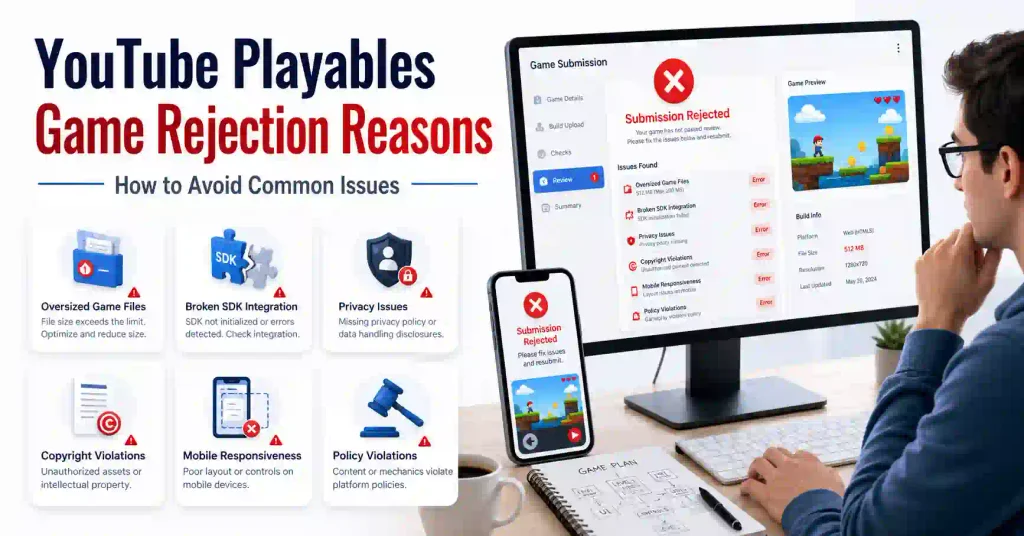
1. Technical Errors and Crashes
A Playable must not have consistently reproducible crashes or errors. It also needs to work correctly with supported YouTube environments and devices. (developers.google.com)
Common problems include:
- Game freezes during loading
- Buttons stop responding
- Restart does not work
- JavaScript errors break gameplay
- Game crashes on mobile
- UI becomes unusable after resizing
- Excessive memory usage
How to avoid it: Test the final production build on different browsers, devices, screen sizes and interaction methods before certification.
2. Initial Bundle Is Too Large
Package size is one of the most important technical checks.
The current Playables documentation states that the initial bundle MUST be less than 30 MiB, while developers SHOULD aim for less than 15 MiB. The initial bundle is measured from the beginning of page loading until the game calls gameReady. (developers.google.com)
The total game bundle must normally be less than 250 MiB. Developers should also keep large assets out of the initial loading path when they are not required immediately. (developers.google.com)
How to reduce the initial bundle
- Compress images
- Optimize audio files
- Remove unused JavaScript
- Remove unused assets
- Split large resources
- Lazy-load later content
- Keep the first interactive screen lightweight
- Call
gameReadyonly when the game is actually ready
Use the Playables testing tools to check loading and bundle behavior before submission.
3. Incorrect Playables SDK Integration
The Playables SDK needs to be loaded before the game’s other code. Incorrect SDK initialization or lifecycle handling can cause certification problems. (developers.google.com)
Two important readiness events are:
firstFrameReady— used when the first loading or presentation screen is ready to display.gameReady— used when the player can actually interact with the game.
Calling gameReady too early can make YouTube consider the game ready before the actual gameplay is available. (developers.google.com)
How to avoid it: Test SDK initialization, readiness events, pause/resume behavior and other Playables APIs using the final build.
4. Broken File Paths and File Names
Packaged Playables should use relative paths for files inside the game bundle. Absolute paths can fail when the game is packaged or moved to the Playables environment. (developers.google.com)
File names also need to follow the supported character restrictions.
For example:
assets/images/player.png
is preferable to a path that depends on a developer’s local computer.
How to avoid it: Test the actual ZIP package instead of testing only the development folder.
5. Poor Responsive or Mobile Experience
A Playable needs to work across different viewport sizes and aspect ratios. Touch and mouse controls must work correctly, and the game should maintain its state when the viewport changes. (developers.google.com)
Common problems include:
- Buttons outside the visible area
- Overlapping text
- Very small touch controls
- Broken portrait layouts
- Stretched graphics
- Game state resetting after resizing
Android zero-viewport issue
Developers should also handle an Android-specific viewport edge case. During initial loading, the viewport height can temporarily be reported as zero. If the game immediately calculates its layout from that value, the UI can appear broken.
How to avoid it: Do not assume that the viewport always has a valid height during the first frame. Handle the temporary zero-height state safely and recalculate the layout when the correct viewport dimensions become available.
Also test the game during initial loading, after gameReady, and after viewport changes.
6. Audio, Focus and Pause/Resume Problems
Audio needs to respect YouTube’s audio settings, device volume and system mute state. A game’s own controls must not bypass YouTube’s mute behavior. (developers.google.com)
Pause and resume behavior is equally important. Playables should use the Playables SDK onPause and onResume callbacks instead of relying on the browser Page Visibility API.
When a Playable is paused, game activity such as rendering, game loops, interaction and network activity should stop as required by the Playables integration rules. (developers.google.com)
Test these situations:
- YouTube mute
- Device volume
- Backgrounding the app
- Focus loss
- Pause
- Resume
- Returning to gameplay
7. Copyright, Trademark and Music Problems
A Playable needs appropriate rights for its content. YouTube’s Trust & Safety requirements cover copyright, trademarks, music and personality rights. (developers.google.com)
Problems can occur when a developer uses:
- Copyrighted characters
- Commercial music
- Sports logos
- Celebrity images
- Trademarked artwork
- Assets copied from another game
How to avoid it: Use original content or obtain the necessary rights and licenses for third-party assets.
8. Duplicate or Substantially Identical Games
Current Playables Trust & Safety requirements prohibit duplicate uploads and Playables that are substantially identical to games already available on the platform. Google added this requirement to the revision history on August 25, 2026. (developers.google.com)
Changing only a few colors, images or text does not necessarily make a substantially identical game different.
How to avoid it: Create meaningful original gameplay, content and presentation instead of repeatedly submitting nearly identical versions.
9. Misleading Titles, Thumbnails or Descriptions
Your metadata should accurately represent the actual game.
A thumbnail should not promise features that are not available. The title and description should also match the real gameplay experience. (developers.google.com)
For example, do not advertise a game as multiplayer if it does not actually provide multiplayer gameplay.
How to avoid it: Review the title, thumbnail, description and in-game experience together before submission.
10. Monetization Violations
Playables have specific monetization restrictions.
External advertising services and off-platform in-app purchases are not allowed. YouTube-provided advertising functionality must be implemented according to the applicable Playables requirements. (developers.google.com)
How to avoid it: Do not add an external ad network, payment gateway or unsupported purchase system simply because it works in a normal HTML5 game.
11. Kids, Age and Content-Safety Problems
Playables must not specifically target children or be presented as “made for kids” or “just for kids.” The current Trust & Safety requirements state that Playables must be suitable for a general audience aged 13 and older. (developers.google.com)
This matters because the Playables environment has specific audience and child-safety requirements.
How to avoid it: Review the game’s characters, language, visuals, gameplay, metadata and promotional material instead of relying only on an age label.
12. Privacy and Personal-Data Collection
Privacy requirements are another important certification area.
Playables must follow the applicable privacy requirements and cannot freely make external calls to websites or services. The current documentation also states that Playables must not prompt users to enter or collect personal information such as names, ages, locations, usernames or passwords. Login and account-creation screens are also not allowed. (developers.google.com)
This is particularly important for games that try to add analytics, tracking, accounts or external APIs.
How to avoid it: Check every data collection and network request against the current Playables Privacy & Data requirements before submission.
13. Accessibility Tags Do Not Match the Game
Developers should make a best effort to follow WCAG AA accessibility practices. Playables can also use accessibility tags to describe supported features. (developers.google.com)
The tags must accurately describe the game.
For example, a developer should not select a screen-reader support tag when the game does not actually provide screen-reader functionality.
The same problem can occur when claiming features such as:
- Captions
- Remappable controls
- Alternative controls
- Other accessibility functionality
How to avoid it: Test each accessibility feature before selecting its corresponding tag.
14. English and Localization Problems
English support is required for Playables. Developers can use the Playables getLanguage API to determine the user’s language or locale. The documentation says developers should not rely on browser localization APIs such as navigator.language or navigator.languages. (developers.google.com)
How to avoid it: Make sure the essential menus, instructions and gameplay information work correctly in English before adding additional languages.
If you support multiple languages, test translated text for clipping, overlapping and incorrect UI sizing.
15. External Links and In-Game Sharing
A Playable should not be treated like a normal website where developers can freely add external links.
Current design requirements prohibit clickable external links inside the game, in-game sharing prompts and additional user agreements. (developers.google.com)
How to avoid it: Keep the core game experience within the Playables environment and use supported YouTube surfaces for permitted information.
16. Code Obfuscation Problems
Developers should be careful with aggressive JavaScript code obfuscation.
Playables require the submitted game to be reviewable and testable during certification. Code that is deliberately transformed to hide its logic can interfere with this process.
How to avoid it: Do not use aggressive code-obfuscation techniques that make the submitted Playable difficult to inspect. Normal minification used to reduce file size is different from deliberately hiding or disguising the code.
Keep the production bundle suitable for certification and testing.
17. Playable Must Use a Single-Page Application Structure
A Playable should operate as a single-page application (SPA) rather than relying on traditional page-to-page navigation.
Menus, settings, levels and gameplay should operate inside the same application without requiring full-page reloads.
How to avoid it: Change screens and game states through JavaScript and UI state rather than navigating to separate HTML pages.
A full-page reload can also interrupt the Playables environment and create unnecessary loading or state-management problems.
18. Server-Side and Backend Dependencies
Some HTML5 games use databases, authentication systems, external APIs or custom backend servers. Developers should not assume that these services can be used in a Playable exactly as they would be on a normal website.
Current privacy requirements restrict external calls except where specifically permitted by the Playables requirements. (developers.google.com)
How to avoid it: Keep the game self-contained whenever possible and verify every required external service against the current Playables documentation before implementing it.
Final YouTube Playables Rejection Checklist
Before submitting your game, check:
- No reproducible crashes or major errors
- Initial bundle is below 30 MiB
- Initial bundle is preferably below 15 MiB
- Total bundle is below 250 MiB
- Individual files meet the applicable size requirements
- Relative file paths are used
- File names follow the required character rules
- SDK loads before game code
firstFrameReadyis correctly implementedgameReadyis called only when the game is interactive- Touch and mouse controls work
- Responsive resizing works
- Android zero-height viewport is handled safely
- Audio and mute behavior work correctly
onPauseandonResumework correctly- Background/focus changes do not break the game
- Copyright and music rights are cleared
- Game is not duplicate or substantially identical to another Playable
- Title, thumbnail and description are accurate
- External monetization is not used
- Personal information is not collected
- English support works correctly
- Accessibility tags are accurate
- No prohibited external links or sharing prompts
- Aggressive code obfuscation is avoided
- Game works as a single-page application
- Backend and external API dependencies comply with Playables requirements
FAQs
What are the most common YouTube Playables game rejection reasons?
Common problems include technical errors, incorrect SDK integration, excessive initial loading size, broken responsive layouts, audio or pause/resume issues, copyright problems, misleading metadata, monetization violations, privacy problems and Trust & Safety violations.
Is 15 MiB the hard initial bundle limit?
No. The current documentation says the initial bundle MUST be less than 30 MiB and SHOULD be less than 15 MiB. The initial bundle is measured until gameReady is called. (developers.google.com)
Is the total Playables bundle limited to 250 MiB?
Yes. The default total bundle requirement is less than 250 MiB, subject to the exceptions described in Google’s documentation. (developers.google.com)
Can I submit a game similar to another Playable?
Developers should be careful because current Trust & Safety requirements prohibit duplicate uploads and Playables that are substantially identical to games already available on the platform. (developers.google.com)
Can I use Google Analytics or another tracking service?
Do not assume that you can. Playables have specific privacy and external-call restrictions. Any analytics or tracking implementation should be checked against the current Privacy & Data requirements before use. (developers.google.com)
How long does YouTube Playables review take?
Google’s public certification documentation does not provide one universal fixed review time for every submission. The certification process is handled through the Playables onboarding and partner process. (developers.google.com)
Can I appeal a rejected Playable?
The public documentation does not specify a universal appeal deadline or guaranteed appeal procedure. If a Playable is rejected, follow the review or support instructions provided through the Playables onboarding and Partner Manager process.
Conclusion
A successful YouTube Playables submission requires more than a game that simply runs in a browser.
Before certification, check technical stability, bundle size, SDK integration, responsive behavior, Android viewport handling, audio, pause/resume, privacy, monetization, accessibility, localization, content rights, duplicate-content rules and Trust & Safety requirements.
The best time to find a rejection problem is before submitting the game. Test the final packaged build, verify the official requirements and fix problems before requesting certification.