
YouTube Playables represents a fundamental shift in game distribution. Instead of competing in crowded app stores, developers can now place their games directly in front of YouTube’s billions of users—with zero install friction. But success requires navigating strict technical and content requirements. This guide covers everything you need to know about the YouTube Playables Requirements for 2026, from bundle size limits and SDK integration to content policies and launch strategies.
What Are YouTube Playables?
YouTube Playables are lightweight web games that run natively inside the YouTube mobile app and desktop website. No downloads. No installs. Just instant play.
Key features:
- Available on YouTube app (iOS and Android) and desktop web
- Game progress automatically syncs across devices where you’re logged into YouTube
- Live in the US, UK, Canada, Australia, India, Malaysia, and Turkey
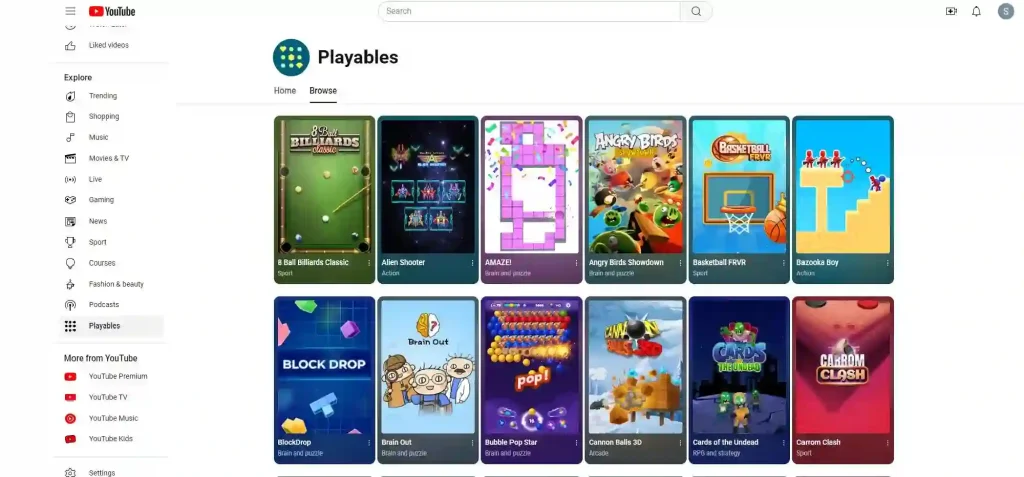
Supported devices:
- Android: YouTube app 20.46+, Android S and above (Android O-R supported on 64-bit or high-memory 32-bit devices)
- iOS: YouTube app 20.44+, iOS 14+
- Desktop/Mobile web: Chrome, Safari, Firefox
The platform is still relatively young—only about 450 games are currently live across all developers—meaning strong visibility opportunities for early movers.
Featured Snippet: YouTube Playables Requirements at a Glance
YouTube Playables Technical Requirements (2026 Update)
Understanding YouTube’s technical constraints is critical—they’re among the strictest in web gaming. When users scroll through their feed, attention spans are measured in fractions of a second. Games that load slowly or break the security sandbox will be rejected.
Bundle Size Limits
Speed is the ultimate priority. YouTube enforces strict file size limits to ensure instant loading:
| Limit | Requirement |
|---|---|
| Initial payload | MUST be under 30 MB (before gameReady fires) |
| Individual file | No single file can exceed 30 MB |
| Total ZIP archive | Up to 200 MB |
| Compression | No compression allowed; decompression fallback is fine |
Large audio tracks or texture atlases must be split or optimized for lazy-loading after the initial start. If your initial payload exceeds 30 MB, the game will not launch.
Supported Game Engines
YouTube supports modern web standards like WebGL and Canvas, so most web-first engines are viable:
✅ Verified engines:
- Unity (WebGL export)
- Godot (WebGL export)
- Cocos Creator
- Construct 3
- Phaser
- PlayCanvas
- LayaAir
- GameMaker
- Defold
- GDevelop
- Custom HTML5/JS frameworks
Platform Interaction Requirements
Games must be “good citizens” within the YouTube ecosystem:
🚫 Prohibited:
- External network calls (no external analytics, multiplayer servers, or payment gateways)
- External tracking (Google Analytics, GameAnalytics, etc.)
- Off-platform in-app purchases
- Compression on your end
✅ Required SDK events:
firstFrameReady– when the game visually appearsgameReady– when the player can actually interact (NOT during loading screens)
✅ Must obey platform commands instantly:
pause– halt all rendering, audio, and gameplaymute– silence all audio immediately- In-game audio settings must never override platform volume controls
✅ Progress saving:
Device and Browser Compatibility
- Aspect ratios: Must support 1:1, 16:9, and 9:16
- Portrait mode: Required
- Landscape mode: Optional but strongly advised for cross-device reach
Content Guidelines and Moderation Rules
YouTube’s review process checks technical compliance and content safety. Games violating these rules will be rejected.
Trust and Safety Requirements
Community Guidelines:
- Game content MUST comply with YouTube Community Guidelines
- Must not contain inappropriate content listed in the guidelines
Age Restrictions:
- ❌ Not allowed: Games designed specifically for children or tagged “made for kids”
- ✅ Required: Suitable for general audience (age 13+)
Prohibited Content:
- Unauthorized music clips or sound effects
- Unlicensed character or personality images
- Excessive violent or sexualized scenes
- Political and religious context
- Misleading metadata or thumbnails
Intellectual Property Requirements
All rights must be fully cleared:
- Trademark rights
- Copyright
- Music rights (all necessary music rights must be secured)
- Personality rights (name, likeness, etc.)
Review and Approval Timeline
Review can take anywhere from several hours to several business days, depending on:
- Submission route (direct vs. partner)
- QA findings
- Resubmission needs
- Developer responsiveness to feedback
Recommendation: Build a buffer into your launch schedule and test thoroughly before submission. On average, expect 2-7 business days from testing start to platform release.
How to Launch YouTube Playables: Step-by-Step
Step 1: Choose a Supported Game Engine
Select an engine capable of producing lightweight web builds. Unity WebGL, Cocos Creator, and Phaser are popular choices.
Step 2: Integrate the SDK and Core APIs
Your game must communicate with YouTube’s native environment. The official SDK handles:
- Game lifecycle events (
firstFrameReady,gameReady) - Platform interaction (pause, mute, resize)
- Analytics and event tracking
Step 3: Optimize UI/UX for Cross-Device Play
YouTube users play on phones, tablets, and desktops:
- Responsive design that scales across 1:1, 16:9, and 9:16 aspect ratios
- Touch-friendly controls for mobile
- Keyboard/mouse support for desktop
- Portrait mode required
Step 4: Test in the Ecosystem
Testing goes beyond finding gameplay bugs:
- Does the game instantly mute when the platform sends a
mutecommand? - Does rendering pause completely when the app is minimized?
- Test across iOS 17+ and Android 14+
- Test with unstable network connections
- Test at different resolutions
Step 5: Submit for Moderation
Package your game into a ZIP archive and submit for review. The moderation team evaluates technical, performance, and content guidelines.
Two Paths to Launch
Path 1: Direct Access
Apply to Google for entry to the YouTube Games Developer Portal:
- Submit an interest form and wait for approval (can take weeks or months)
- Need Channel Manager rights in YouTube Studio
- Integrate official YouTube Playables SDK yourself
- Manage testing, certification, and live ops independently
Path 2: Partner Access (Faster Route)
Publish through a verified partner that already has portal access:
- Skip the approval queue
- Hit the ground running with existing traffic
- Partners handle SDK integration, optimization, and compliance
Example: Playgama is an official YouTube Playables partner with 20+ games already live. Developers integrate the Playgama Bridge SDK—a single kit containing required YouTube bindings—instead of applying to Google directly.
Monetization in 2026
Current Monetization Status
✅ Active:
- Prerolls: Ads that play before the user enters main gameplay (on by default, can’t be disabled)
- Interstitials: Full-screen ads appearing at natural breaks (between levels, after Game Over)
- Rewarded Ads: Opt-in ads players choose to watch for in-game benefits (extra lives, currency, cosmetic items)
❌ Not yet supported:
Important Implementation Note
Monetization features are rolling out gradually across different regions. Your game code MUST check whether ad placements are supported before attempting to trigger an ad call. Failing to implement this check can lead to broken game logic in unsupported regions.
Revenue KPIs
- Player retention and session length: Longer sessions = more ad impressions
- Number of game sessions
- Player geography: Players in high-CPM regions (North America, Western Europe) generate substantially more revenue per impression
Target: Games that sustain an average playtime of around 10 minutes per session typically perform best.
Note on monetization future: While some industry speculation suggests YouTube may eventually introduce models similar to Facebook Instant Games (IAA and IAP with developer revenue share) or adopt a subscription-funded model, these remain unconfirmed. Currently, only ad-based monetization is active.
FAQ
1. What file size limits does YouTube Playables have?
The initial payload must be under 30 MB, no individual file can exceed 30 MB, and the total ZIP archive can be up to 200 MB.
2. Can I use analytics tracking in my game?
No. External network calls—including analytics trackers like Google Analytics and GameAnalytics—are strictly prohibited.
3. What game engines are supported?
Unity (WebGL), Cocos Creator, Construct 3, Phaser, PlayCanvas, Godot, GameMaker, Defold, GDevelop, and custom HTML5/JS frameworks.
4. Can I make games for children?
No. Games designed exclusively for children or tagged “made for kids” are not accepted. Games must be suitable for general audiences (age 13+).
5. How long does the review process take?
Typically 2-7 business days from testing start to platform release, depending on submission route, QA findings, and responsiveness to feedback.
6. What ad formats are available?
Prerolls (on by default), interstitials (at natural breaks), and rewarded ads (opt-in for in-game benefits).
7. Can I monetize with in-app purchases?
Not yet. IAP, subscriptions, and buy-to-play models are not currently supported.
8. Which countries are Playables available in?
Australia, Canada, India, Malaysia, Turkey, the United Kingdom, and the United States.
6 thoughts on “Best YouTube Playables Requirements Guide 2026: SDK, Rules & Monetization”