
The gaming industry is rapidly shifting toward instant-play experiences, and YouTube Playables is at the center of this transformation. Instead of requiring users to download games from app stores, YouTube Playables allows players to launch and enjoy games directly within YouTube.
For developers, this creates a unique opportunity to reach billions of users through one of the world’s largest content platforms. However, joining the YouTube Playables ecosystem isn’t as simple as uploading a game. Developers must meet technical, quality, and user-experience standards before being considered for approval.
In this guide, you’ll learn everything about the YouTube Playables Developer Program, including requirements, approval factors, common mistakes, and strategies to maximize your chances of acceptance.
What Is YouTube Playables?
YouTube Playables is a gaming initiative that allows users to play games instantly inside YouTube without installing separate applications.
The platform focuses on accessibility, fast loading, and seamless gameplay experiences across multiple devices.
Key Benefits of YouTube Playables
| Benefit | Description |
|---|---|
| Instant Access | No app installation required |
| Massive Audience | Reach billions of YouTube users |
| Cross-Platform Support | Mobile, desktop, tablet, and TV |
| Improved Discovery | Integration within YouTube ecosystem |
| Better Engagement | Reduced user acquisition friction |
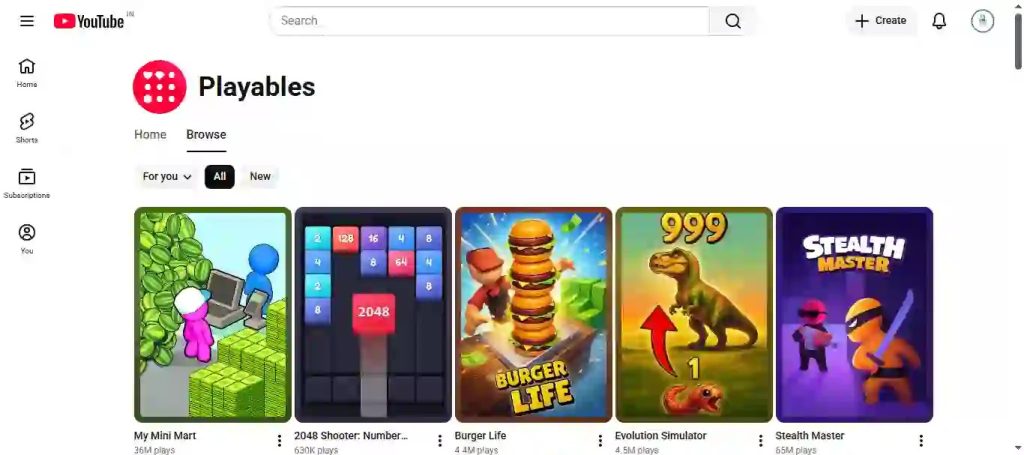
Why Developers Want Access to YouTube Playables
Traditional mobile games face several challenges:
- High acquisition costs
- Intense app store competition
- Installation barriers
- Reduced discoverability
YouTube Playables removes many of these obstacles by allowing users to begin playing immediately after discovering a game.
Advantages for Developers
Massive Reach
YouTube serves billions of monthly users globally, creating unprecedented opportunities for game discovery.
Better User Retention
Players can quickly return to games without reinstalling or navigating external app stores.
Creat Friction
Reducing installation requirements often increases player engagement.
YouTube Playables Developer Program Requirements
Approval depends on several important factors.
1. High-Quality Gameplay Experience
YouTube prioritizes games that provide:
- Smooth performance
- Fast loading speeds
- Responsive controls
- Stable gameplay
- Strong user engagement
Additional Playables Requirements
Audio Management
Your game should include a clear mute/unmute option. Many users browse YouTube in public places or while multitasking, making audio control an important usability requirement.
Session Persistence (Auto-Save)
Games should preserve player progress whenever possible. If a user receives a phone call, minimizes the YouTube app, switches tabs, or experiences a temporary interruption, gameplay progress should not be lost unnecessarily.
Reliable session persistence improves retention and overall player satisfaction.
Recommended Metrics
| Metric | Recommended Target |
|---|---|
| Initial Load Time | Under 5 seconds |
| Frame Rate | 30 FPS or higher |
| Crash Rate | Less than 1% |
| Memory Usage | Optimized |
| Responsiveness | High |
2. HTML5-Compatible Development
Most Playables-compatible games use web technologies such as:
- HTML5
- JavaScript
- WebGL
Common Frameworks
| Framework | Recommended |
|---|---|
| Phaser | Yes |
| PixiJS | Yes |
| Construct | Yes |
| Unity WebGL | Yes |
| Three.js | Yes |
3. Cross-Platform Compatibility
Your game should function consistently across:
- Android devices
- iOS devices
- Tablets
- Desktop browsers
- Smart TVs (where applicable)
Cross-device testing is essential before submission.
4. Policy Compliance
Games must comply with platform guidelines and applicable laws.
Avoid Content Such As:
- Hate speech
- Excessive violence
- Adult content
- Gambling mechanics
- Illegal activities
- Misleading advertising
Policy violations can lead to rejection regardless of gameplay quality.
5. Strong User Experience (UX)
User experience plays a major role in approval decisions.
Best Practices
- Clear onboarding
- Simple navigation
- Fast menus
- Readable UI
- Mobile-friendly controls
New users should understand gameplay within seconds.
Step-by-Step Approval Process
Step 1: Build a Playables-Ready Game
Before applying, ensure your game:
✔ Loads quickly
✔ Works on multiple devices
✔ Meets content policies
✔ Provides stable gameplay
✔ Includes session persistence
✔ Supports audio management
Step 2: Create a Developer Presence
Prepare:
- Professional studio website
- Developer portfolio
- Support contact information
- Privacy Policy
- Terms of Service
Helpful Resources
Keep track of official updates via the Google Developers Gaming Portal and official YouTube announcements.
Important: Avoid submitting games through generic YouTube contact forms unless specifically instructed through official program documentation.
Step 3: Prepare Technical Documentation
Provide documentation covering:
| Requirement | Description |
|---|---|
| Game Overview | Core gameplay explanation |
| Supported Platforms | Mobile/Desktop |
| Technology Stack | Engine and framework details |
| Monetization Strategy | Ads, purchases, or other methods |
| Testing Results | Performance benchmarks |
Step 4: Submit Your Application
Applications typically require:
- Studio information
- Game details
- Technical specifications
- Testing evidence
- Compliance confirmation
Step 5: Review Process
Reviewers generally evaluate:
Technical Quality
- Performance
- Stability
- Optimization
Gameplay Quality
- Engagement
- Accessibility
- Retention potential
Compliance
- Content standards
- Privacy considerations
- User safety
Common Reasons Applications Get Rejected
Understanding common rejection factors can significantly improve approval chances.
Poor Performance
Issues may include:
- Slow loading
- Lag
- Excessive memory usage
- Frequent crashes
Weak User Experience
Examples include:
- Confusing controls
- Poor onboarding
- Difficult navigation
Limited Optimization
Games not optimized for mobile experiences may face challenges during review.
Policy Violations
Even minor violations can delay or prevent approval.
Developer Review Checklist Before Applying
Use this checklist before submitting:
- ✅ Game loads in under 5 seconds
- ✅ Mobile devices tested
- ✅ Desktop browsers tested
- ✅ Audio mute/unmute available
- ✅ Session persistence implemented
- ✅ Privacy Policy published
- ✅ Terms of Service available
- ✅ Support page created
- ✅ No policy violations detected
- ✅ Stable gameplay confirmed
- ✅ Portfolio website updated
- ✅ Technical documentation prepared
How to Increase Approval Chances
Optimize Performance
Consider implementing:
- Asset compression
- Code minification
- Lazy loading
- Efficient rendering
- Caching strategies
Performance Optimization Table
| Optimization | Impact |
|---|---|
| Image Compression | High |
| Lazy Loading | High |
| Code Minification | Medium |
| Asset Bundling | High |
| Browser Caching | High |
Improve Retention Metrics
Focus on:
- Achievement systems
- Progression mechanics
- Daily rewards
- Engaging gameplay loops
Perfect the First Session
The first minute is critical.
Players should:
- Understand objectives immediately
- Experience quick success
- Feel motivated to continue
Test Extensively
Recommended testing includes:
Device Testing
- Android
- iPhone
- Tablets
Browser Testing
- Chrome
- Firefox
- Edge
- Safari
Monetization Opportunities
Approved developers may gain access to various monetization options depending on platform capabilities.
Advertising
Potential formats may include:
- Rewarded ads
- Interstitial placements
- Display advertising
In-Game Purchases
Possible offerings:
- Cosmetic items
- Premium content
- Expansion packs
Avoid aggressive monetization practices that negatively impact user experience.
Creator Partnerships
The YouTube ecosystem creates opportunities for:
- Influencer promotions
- Creator collaborations
- Sponsored events
Web Optimization & Developer Credibility
While SEO doesn’t directly influence YouTube’s internal recommendation or discovery systems, having a highly optimized studio website helps establish your credibility during manual reviews and partnership evaluations.
Optimize Your Studio Website
Ensure your portfolio includes:
Essential Pages
- Homepage
- Privacy Policy
- Terms of Service
- Dedicated Support Page
- Contact Information
Structured Data
Implement:
- Organization Schema
- SoftwareApplication Schema
These help search engines understand your studio and products more effectively.
Core Web Vitals for Portfolios
Reviewers expect a professional and fast-loading experience when evaluating your website.
| Metric | Target |
|---|---|
| LCP (Largest Contentful Paint) | Under 2.5 seconds |
| CLS (Cumulative Layout Shift) | Under 0.1 |
| INP (Interaction to Next Paint) | Under 200ms |
A polished website won’t guarantee approval, but it strengthens your professional credibility.
E-E-A-T Best Practices for Game Studios
Google values trustworthy creators and businesses.
Experience
Demonstrate real-world game development experience.
Expertise
Publish technical articles and development insights.
Authoritativeness
Build recognition through quality games and industry participation.
Trustworthiness
Maintain transparent policies, support channels, and business information.
Future of YouTube Playables
The future of browser-based gaming continues to grow as users increasingly prefer instant access experiences.
As YouTube expands its gaming ecosystem, developers who prepare early may benefit from increased visibility, lower acquisition costs, and access to a massive global audience.
Building high-quality, optimized, and user-focused games today can position studios for future opportunities within the Playables ecosystem.
Conclusion
Getting approved for the YouTube Playables Developer Program in 2026 requires more than simply building a game. Developers must demonstrate technical excellence, strong user experience, policy compliance, and professional credibility.
By focusing on performance optimization, cross-platform compatibility, session persistence, audio management, and player engagement, developers can significantly improve their chances of approval while preparing for long-term success within YouTube’s growing gaming ecosystem.
Faqs
Is YouTube Playables available to all developers?
No. Developers typically need to meet platform quality and compliance requirements before gaining access.
What type of games perform best on YouTube Playables?
Casual games, puzzle games, arcade experiences, and short-session titles generally align well with instant-play environments.
Do I need Unity to build a Playables game?
No. Developers can use HTML5-compatible frameworks such as Phaser, PixiJS, Construct, or Unity WebGL.
How long does approval take?
Review timelines vary based on application quality, testing requirements, and program availability.
Can indie developers get approved?
Yes. Independent developers can qualify if their games meet the required standards.
Does YouTube Playables support monetization?
Approved developers may have access to monetization opportunities depending on program policies and platform capabilities.
5 thoughts on “How to Get Approved for the YouTube Playables Developer Program (2026 Guide)”