If you are building interactive ads, you already know that YouTube Playables [ free assets for YouTube Playables ] are a game-changer. They let users actually play a mini-game right inside the video player. But here is the catch: these interactive ads need to load instantly, which means you cannot just drop a massive, heavy game file into the ad network. You need lightweight, highly optimized files.
How To Upload Game In Youtube Playables
This is where finding the right free assets for YouTube Playables becomes your biggest advantage. Whether you are an indie developer, a small ad agency, or a marketer trying to boost click-through rates, building from scratch takes too much time and money.
In this 2026 guide, we will break down exactly where to find top-tier HTML5 game assets, how to use them step-by-step, and how to optimize them so your playable ad loads in milliseconds.
What Are YouTube Playables and Why Do They Need Specific Assets?
Before we dive into the resources, let us quickly clarify what makes a playable ad different from a regular mobile game.
YouTube Playables are essentially HTML5 games. They run directly in the browser (or the YouTube app’s web view). Because they are served as ads, they have strict technical limits:
- Tiny file sizes: Usually under 2MB to 5MB for the initial load.
- Mobile-first design: 90% of your users will be on phones.
- Short attention spans: You have about 3 to 5 seconds to hook the player.
Because of these limits, you cannot use standard game assets. You need specifically optimized playable ad templates and lightweight graphics. Using heavy 4K textures or uncompressed WAV audio files will get your ad rejected by the platform.
YouTube Playables Interest Form:
Step-by-Step Guide to Sourcing Free Assets for YouTube Playables
Finding the right files is only half the battle. You need to know exactly what to look for at each stage of development. Here is your step-by-step workflow.
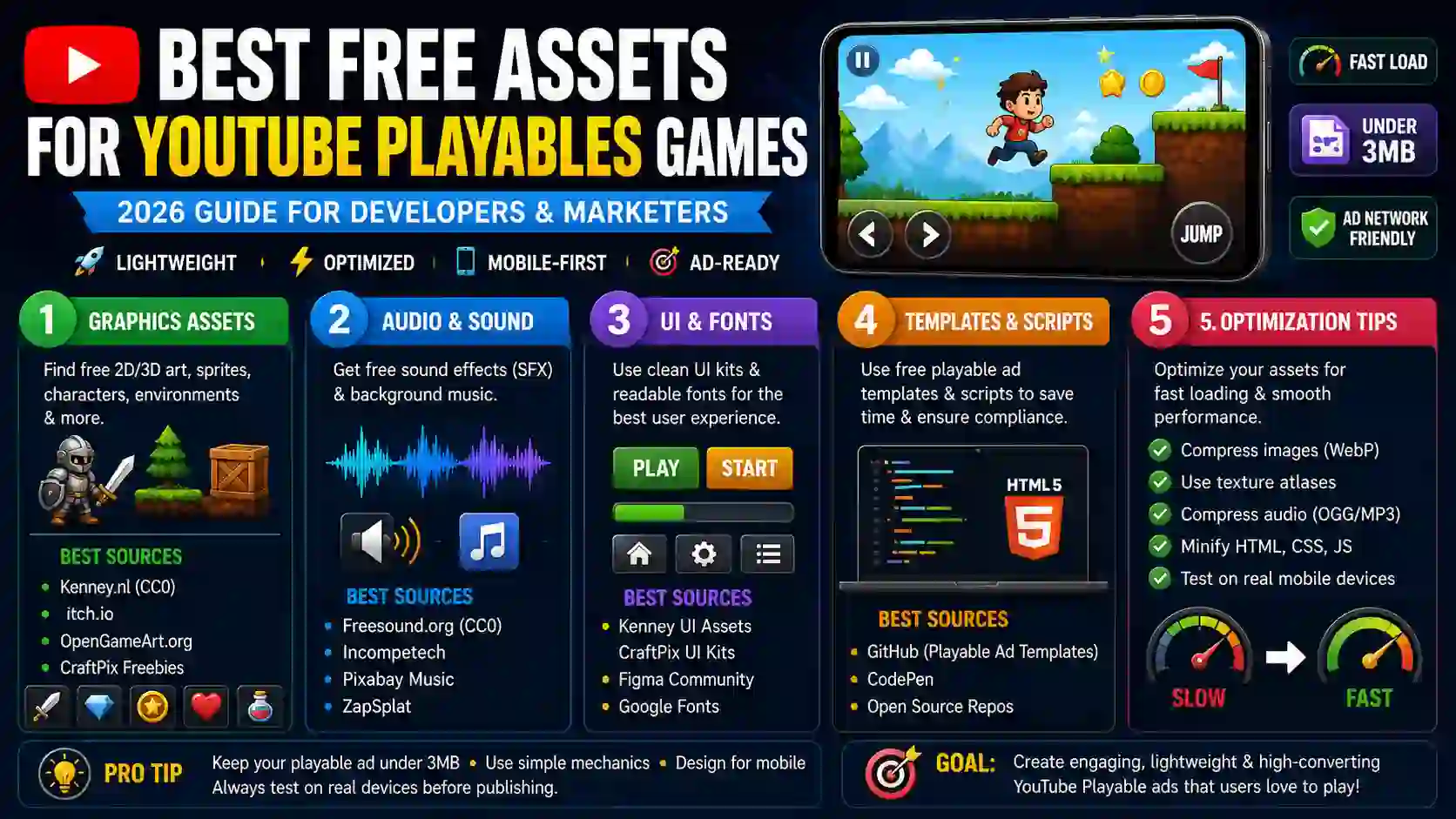
Step 1: Finding Free 2D and 3D Graphics
For playable ads, 2D is usually king because it is naturally lighter. If you are making a 3D playable, you need low-poly models.
- Look for free 2D sprites for games that come in sprite sheets. Sprite sheets reduce the number of HTTP requests and draw calls, which speeds up loading.
- If you need 3D, search for low-poly models with baked lighting. Do not use real-time shadows in a playable ad; it will kill your frame rate on older phones.
Step 2: Sourcing Royalty-Free Audio and SFX
Audio is tricky in playable ads. Many platforms auto-play them muted, but when the user taps to unmute or interact, the sound needs to trigger instantly.
- Look for short, punchy sound effects (SFX).
- Avoid long background music tracks. If you use music, keep it under 15 seconds and loop it seamlessly.
- Always download audio in OGG or MP3 formats at a low bitrate (like 64kbps or 96kbps).
Step 3: Grabbing UI Elements and Fonts
A playable ad needs clear instructions. “Tap to Jump” or “Swipe to Merge” needs to be highly visible.
- Search for UI kits for HTML5 games. You need simple buttons, progress bars, and pop-up windows.
- For fonts, stick to clean, bold sans-serif fonts. They are easier to read on small mobile screens and usually have smaller file sizes than complex serif fonts.
Step 4: Using Free Playable Ad Templates and Scripts
Do not write your ad-tracking code from scratch.
- Look for open-source playable ad templates. These templates already have the “End Card” (the final screen with the download button) and the ad-network SDKs pre-configured.
- Using a pre-built template saves you hours of debugging and ensures your ad complies with YouTube’s strict technical policies.
Top Platforms to Get Free Game Assets for Playable Ads in 2026
Now that you know what you need, where do you actually get them? Here are the most reliable platforms to find free game assets for playable ads without worrying about hidden paywalls.
1. Kenney.nl (The Absolute Goldmine)
If you only bookmark one site, make it Kenney. Kenney provides thousands of 2D, 3D, and audio assets completely free under the CC0 (Creative Commons Zero) license. This means you can use them for commercial playable ads without even crediting the author.
- Best for: Low-poly 3D models, clean 2D UI, and basic SFX.
- Link: Kenney Assets
2. itch.io (Game Assets Section)
itch.io is famous for indie games, but its asset store is massive. Many creators release free asset packs to build their audience. You can filter by “Free” and look for packs specifically tagged with “HTML5” or “Mobile”.
- Best for: Unique art styles, pixel art, and complete 2D character sprite sheets.
- Link: itch.io Free Game Assets
3. OpenGameArt.org
This is one of the oldest communities for free game art. The interface looks a bit dated, but the library is huge. You can find everything from 8-bit sounds to vector graphics. Just pay attention to the license on each asset (some require attribution).
- Best for: Retro styles, 2D backgrounds, and specific sound effects.
- Link: OpenGameArt
4. CraftPix (Freebies Section)
CraftPix sells premium assets, but their freebies section is updated regularly. They offer high-quality 2D character packs, backgrounds, and GUI kits. The art style here is usually very polished, making it great for hyper-casual playable ads.
- Best for: High-quality 2D GUI, character animations, and isometric assets.
- Link: CraftPix Freebies
5. Freesound.org and Incompetech (For Audio)
For sound effects, Freesound.org is a massive collaborative database. Just filter by “Creative Commons 0” to avoid attribution requirements. For background music, Kevin MacLeod’s Incompetech remains a legendary resource for free, royalty-free tracks (just make sure to include his credit in the ad’s end card if required by the license).
Best Practices for Optimizing Assets for YouTube Playables
Getting the assets is easy. Making them run smoothly inside a YouTube Playable is the hard part. If your ad lags, users will swipe away, and your campaign will fail. Follow these optimization rules strictly.
Point 1: Keep File Sizes Tiny
Your entire playable ad should ideally be under 3MB.
- Images: Convert all PNGs to WebP or JPEG. Use tools like TinyPNG to compress them further without losing visual quality.
- Audio: Never use WAV files. Convert everything to MP3 or OGG.
- Code: Minify your JavaScript and CSS files. Remove all unnecessary comments and white space.
Point 2: Use Texture Atlases
Instead of loading 50 individual small images for your characters and UI, combine them into one large image called a texture atlas (or sprite sheet). This reduces the number of server requests from 50 down to 1, drastically improving load times. You can use free tools like TexturePacker to create these.
Point 3: Ensure Cross-Browser and Mobile Compatibility
YouTube Playables run inside the YouTube app, which uses different web views on iOS (WebKit) and Android (Chrome/WebView).
- Test your HTML5 game assets on both an iPhone and an Android device.
- Avoid using heavy WebGL shaders if you are targeting low-end Android phones. Stick to simple 2D canvas rendering or very basic WebGL.
Point 4: Design for Touch, Not Mouse
Remember, this is a mobile-first experience.
- Make sure your tap targets (buttons, interactive elements) are at least 44×44 pixels.
- Do not rely on “hover” states, because there is no mouse hover on a touchscreen.
Common Mistakes to Avoid When Using Free Assets
Even experienced developers mess this up. Here is what you need to watch out for when using free assets for YouTube Playables.
- Ignoring the License: Just because it is free does not mean you can use it commercially. Always check if the license is CC0 (do whatever you want), CC-BY (you must credit the creator), or Non-Commercial (you cannot use it for ads).
- Mixing Art Styles: Do not mix realistic 3D characters with cartoonish 2D backgrounds. It looks unprofessional and confuses the player. Stick to one cohesive art style.
- Forgetting the “Fail” State: Playable ads need a game loop. If the player loses, what happens? Many developers forget to create a “Game Over” screen that smoothly transitions into the final End Card (the call-to-action to download the app).
- Overcomplicating the Gameplay: You only have a few seconds. Do not add complex tutorials. The game should be instantly understandable. Tap to jump, swipe to match, drag to shoot. Keep it simple.
Final Thoughts
Building high-converting interactive ads does not require a massive budget. By leveraging the right free assets for YouTube Playables, you can create engaging, high-quality experiences that drive real results.
The key to success in 2026 is not just finding free stuff; it is finding the right free stuff and optimizing it ruthlessly for mobile performance. Start with reliable sources like Kenney and itch.io, stick to lightweight HTML5 game assets, and always test your final build on actual mobile devices.
Grab your assets, keep your file sizes small, and start building playables that users actually want to play.
1. What is the maximum file size for a YouTube Playable ad?
While it can vary slightly based on the specific ad network setup, the general rule for 2026 is to keep the initial HTML5 package under 3MB to 5MB. Always check the specific documentation of the ad serving platform you are using.
2. Can I use Unity or Godot to make YouTube Playables?
Yes, but you have to be careful. Both engines support HTML5 WebGL exports. However, the default export settings are usually too heavy. You must heavily strip down the engine, remove unused modules, and compress the build to make it viable for a playable ad. Many developers prefer lightweight frameworks like Phaser or Construct 3 for this reason.
3. Do I need to credit the artist if I use CC0 assets?
No. CC0 (Creative Commons Zero) means the creator has waived all their rights. You can use, modify, and distribute the assets for commercial projects without giving credit. However, if the asset is CC-BY, you must include the creator’s name in your end card or credits.
4. Where can I find free playable ad templates?
GitHub is a great place to start. Search for “playable ad template” or “HTML5 ad template”. Many ad agencies open-source their basic boilerplate code to help the community. You can also find basic templates on CodePen.
2 thoughts on “Best Free Assets for YouTube Playables Games (2026 Guide)”